Kelian Lalloué
In this article:
The H1 tag is the main title of a web page: it tells Google and your readers what the page is about. Good H1 tag SEO comes down to three rules: one H1 per page, your main keyword used naturally, and a clear promise. H2 tags then divide the page into main sections, and H3 tags refine each one.
A coherent heading hierarchy rests on these three distinct levels, which structure your content for Google and for your readers alike. Together, the H1, H2, and H3 tags, also called header tags or heading tags, form the semantic backbone of your page.
Below, you will find the exact role of each tag, how to organize your headings around your clients' search intent, and concrete methods to write optimized headings, including with ChatGPT. We finish with two simple ways to check the headings on your own website.
What are H1, H2, and H3 tags?
On a web page, headings are never placed at random. Each tag has a precise job.
The H1 tag: the title
The H1 tag is the main title of the page. It must be unique, consistent with the topic, include your main keyword (the one you identified in your keyword research), and make people want to read on. A good H1 is a clear promise.
Examples: "How to Choose a Tax Attorney in Houston" or "Law Firm Website Design: The Complete Guide."
Do not confuse the H1 with the title tag, the clickable title Google shows in its results. Google may rewrite a weak title using your H1, so keep the two consistent. Our guide to law firm website SEO covers title tags in detail.
The H2 tag: the subheading
The H2 tag marks the main sections of your content. It is the backbone of your argument: every important part of your text should open with an H2. Ideally, each H2 is phrased as a search intent, the way a client would type the question into Google.
For example, if your H1 is "Why Every Law Firm Needs a Blog," your H2s could be "The Benefits of a Professional Blog," "What Should You Publish?" or "How to Reach 10,000 Visits a Month."
The H3 tag: the sub-subheading
Finally, the H3 tag refines the point. It structures the inside of an H2. Think of each H3 as a section in its own right, useful when you develop a sub-idea or want to add a clarification.
Why do heading tags matter for SEO?
H1, H2, and H3 tags are ranked headings. Their role is not visual but semantic: they show Google the logical structure of your content, and they contribute strongly to your law firm SEO.
They improve your rankings
A well-optimized heading contains your main keyword, or a close variant, in a natural way. This helps Google clearly match your page to a search. For example, if you run a family law firm in Denver, your H1 could read "Family Law Attorney in Denver."
Each heading level then deepens and structures the topic. Headings are a strong semantic anchor. Build them well and you create a logical, readable topic cluster.
They structure the information
Heading tags rank the information on a web page. For Google, they are a strong signal of structure and relevance.
They help Google understand what your page is about, in what order, and which topics you want to rank for.
They hold the reader's attention
For your visitors, headings guide the reading. Attention is short, and clear headings let people scroll with purpose and grasp the key information in a few seconds.
And the easier a page is to read, the longer visitors stay. The longer they stay, the more Google sees your content as relevant.
How to structure your headings around search intent
A good heading structure is not there to look nice in the code. It should mirror the way your reader thinks and meet their expectations.
An example: an uncontested divorce page
Say you are writing a page about uncontested divorce. Your outline could look like this:
- H1: Uncontested Divorce: Requirements, Steps, and Costs
- H2: What Is an Uncontested Divorce?
- H2: Who Qualifies for an Uncontested Divorce?
- H2: How to Get an Uncontested Divorce, Step by Step
- H3: Reaching an Agreement With Your Spouse
- H3: The Role of Your Lawyer
- H3: Filing the Paperwork With the Court
- H2: How Much Does an Uncontested Divorce Cost?
Why this outline works
This structure follows the searcher's reasoning: what it is, whether it applies to them, how it works, and what it costs. It shows Google that you covered the topic in depth and in a logical order.
How to write H1, H2, and H3 tags: practical tips
Here is the checklist we use, one line per tag.
| Tag | Its job | What to check |
|---|---|---|
| H1 | Make the first impression | Unique, descriptive, includes the main keyword |
| H2 | Answer the big questions | Phrased like the questions your clients type, found for free in Google autocomplete |
| H3 | Structure the detail | Lists, technical paragraphs, clearly identified subtopics |
For all three levels: work your keywords in naturally where you can, and never write an empty heading.
The H1: make it unique and clear
It is the first thing Google and your visitors will see. It must be:
- Unique: one H1 per page
- Descriptive: it clearly reflects the content of the page
- SEO-optimized: it includes your main keyword
The H2s: structure your message
Your H2s should answer the main questions your clients ask. Think of questions such as "Why See an Employment Lawyer?" or "How Does Joint Custody Work?"
For ideas, use Google autocomplete, which is free: type the start of a question into Google and read the suggestions.
The H3s: go into detail
H3 tags divide your H2s even more finely. Do not overuse them, but use them for lists, technical paragraphs, or clearly identified subtopics.
Work your keywords in without forcing them
Do not stuff your headings with keywords. Google is not fooled. Prefer natural phrasing, as if you were writing for a human reader.
For example:
- Good: "Employment Lawyer in Chicago: How to Choose the Right One"
- Bad: "Employment Lawyer Chicago Best Cheap Urgent Wrongful Termination Lawsuit"
Avoid empty headings
"Welcome to Our Website" or "Home" as an H1 should be banned. They tell Google nothing, and they tell the reader nothing either.
How to write your H1, H2, and H3 tags with ChatGPT
ChatGPT can become a real assistant to structure your web pages and support your law firm content marketing. Here is how to use it well to write H1, H2, and H3 tags that are consistent, readable, and optimized for SEO.
1. Give it precise context
The clearer you are, the better the result. Specify:
- the topic of your page (for example: uncontested divorce, drafting an LLC operating agreement, an employment lawsuit),
- your target audience (for example: individuals, business owners, HR managers),
- your location (for example: lawyer in Atlanta, Dallas, or Miami),
- and the style you want (for example: formal, educational, reassuring).
Useful prompt:
"Suggest an H1, H2, and H3 structure for the page of a family law attorney in Atlanta, written for individuals. The style should be clear, professional, and educational."
2. Check the hierarchy it generates
The H1 must be unique and sum up the whole page. The H2s should cover the main sections, and the H3s should back them up with detail.
3. Ask it to rewrite your existing headings
You already have a page, but your headings are flat or not optimized? ChatGPT can rewrite them around a target keyword and make them more compelling, without losing clarity.
Useful prompt:
"Here are three H2 headings from a real estate lawyer's page in Chicago. Improve them so they are more engaging while keeping a professional tone. The keyword to include is 'real estate lawyer Chicago.'"
4. Have it generate the HTML markup directly
If you manage your own website on a CMS (WordPress, Webflow, and so on), save time with ready-to-use HTML.
Useful prompt:
"Write complete HTML markup (H1, H2, H3) for a practice area page about 'business lawyer in Miami,' with a clear, structured tone."
ChatGPT will reply with markup you can copy and paste into your page.
5. Balance SEO and readability
Remember that your headings are not there only for Google. They also guide your readers. ChatGPT can help you find the right balance between SEO (a smooth use of the keyword) and readability for the visitor.
Useful prompt:
"Can you work the keyword 'car accident lawyer Phoenix' naturally into an H1 and two H2s, without it sounding forced?"
To go further, read our guide to ChatGPT for lawyers.
How to check your heading tags: a quick audit
Several simple methods let you check the headings on your website.
Method 1: view the heading tags in the source code (Chrome or Firefox)
Step 1: Open the page to analyze
Go to your own website or to any web page.
Step 2: Right-click anywhere on the page (except on an image)
- Click "View page source."
Step 3: A new tab opens with the raw HTML code
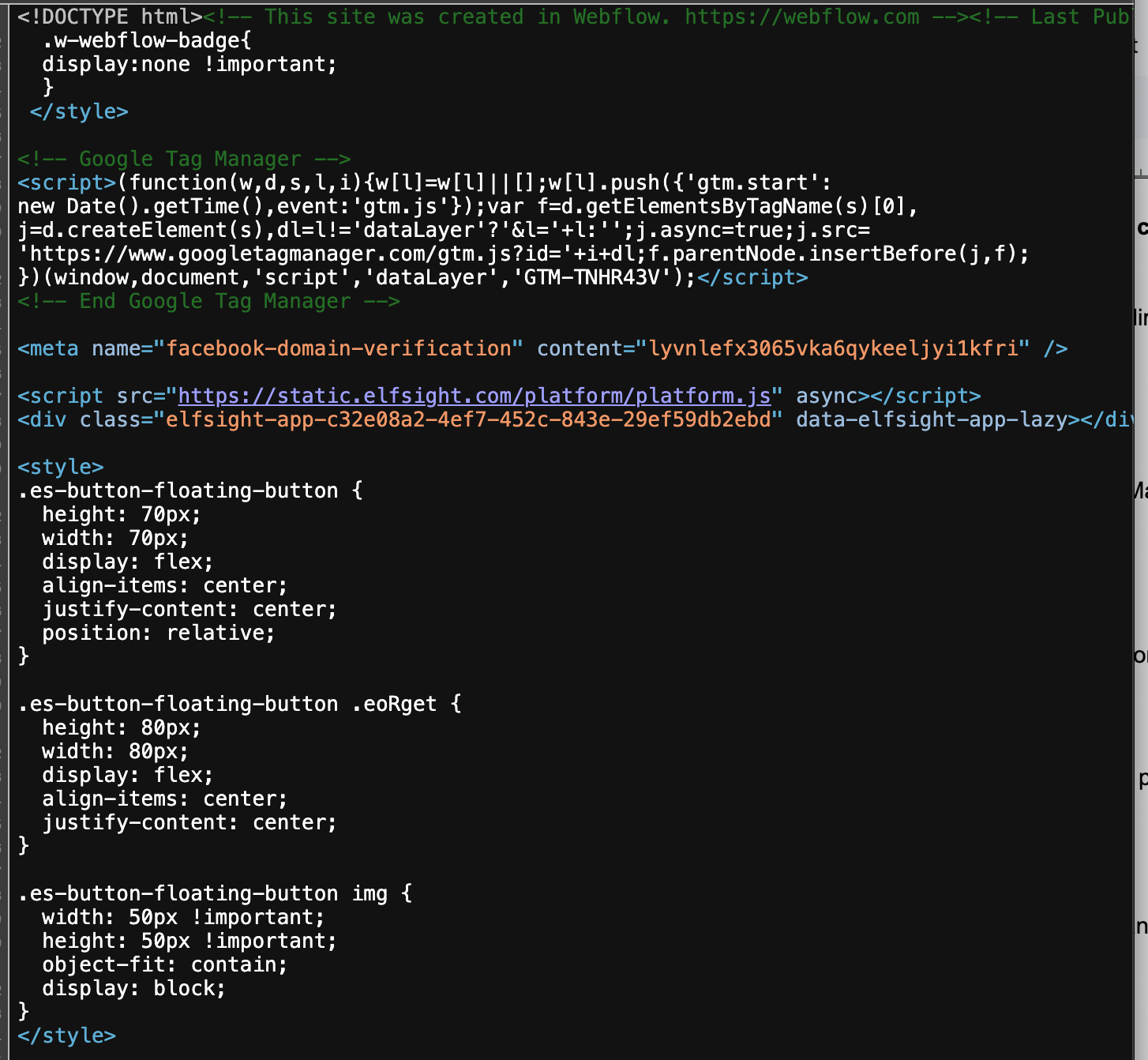
It is a document full of tags, hard to read at first. Do not panic: you only need one trick.
Step 4: Search for the heading tags
- Press Ctrl + F (or Cmd + F on a Mac) to open the search bar.
- Type, one after the other:
- <h1> to see the main title
- <h2> to see the subheadings
- <h3> to see the sections organized under the H2s
If that does not work:
If "View page source" does not appear when you right-click, try this quick alternative:
- On your keyboard, press Ctrl + U (Windows) or Cmd + Option + U (Mac). The source code opens directly in a new tab.
- Then continue with Ctrl + F to search for the tags.
Method 2: use your browser's inspector (Chrome or Firefox)
Step 1: Open the page to analyze
Go to the page on your website, or to any other page you want to analyze.
Step 2: Right-click the text you want to inspect
- For example, right-click a heading or a block of text.
- Click "Inspect."
- The window then splits in two:
- at the top, the page as you see it,
- at the bottom or on the right, the HTML code of that exact area.
Step 3: Find the heading tag in the code
- The code for the element you clicked is highlighted automatically.
- You will see something like:
- <h1>Car Accident Lawyer in Phoenix</h1>
- <h2>Practice Areas</h2>
Your goal here: check that your most important title uses the <h1> tag, the subsections use <h2>, and the details use <h3>, without overdoing it.
Step 4: Navigate the code
- You can expand the parent and child elements by clicking the small arrows to the left of the code.
- This lets you see the whole hierarchy of the page.
Headings are only one part of a full review. To check the rest of your site, read our guide to a law firm SEO audit.
Quick answers to common heading tag questions
Can a page have more than one H1?
No. One H1 tag per page, always. Otherwise, Google cannot tell what the main topic is.
How many H2 and H3 tags should a page have?
There is no fixed rule. But each main idea gets one H2. Then refine with H3 tags if needed.
What happens if a page has no heading tags?
Google will still read your page, but with less clarity. You risk ranking poorly.
Should every heading contain the exact keyword?
It is tempting, but pointless. Aim for natural variations of your keyword.
Do the privacy policy and contact pages need headings?
Yes, even if they are basic. Give each one at least a clear H1.
The bottom line on H1, H2, and H3 tags
As you have seen, mastering H1, H2, and H3 tags is not a technical detail reserved for developers. It is a strategic lever for your SEO, and above all a way to guide your readers, your prospective clients, and Google.
To go further, read our guides on how to write an effective meta description, how to organize your practice area pages, and how to build a law firm website structure that strengthens your site's authority. For the full method, start with our complete law firm SEO guide.
Frequently asked questions
-
The H1 tag is the main title of a web page, the first level of the heading hierarchy in its HTML code. It announces the subject of the page to your visitors and to Google. It should be unique, describe the page clearly, and include the main keyword. On a practice area page, it can be as simple as "Car Accident Lawyer in Phoenix."


"Premium Divorce Austin"↗


4.8 based on 30+ clients




Only 5
law firms per year
Imagine 50% of your revenue coming from Google.
Position your law firm smartly in search results with our SEO and Google Ads expertise. See how we deliver stable, predictable results over time, all in an automated way.